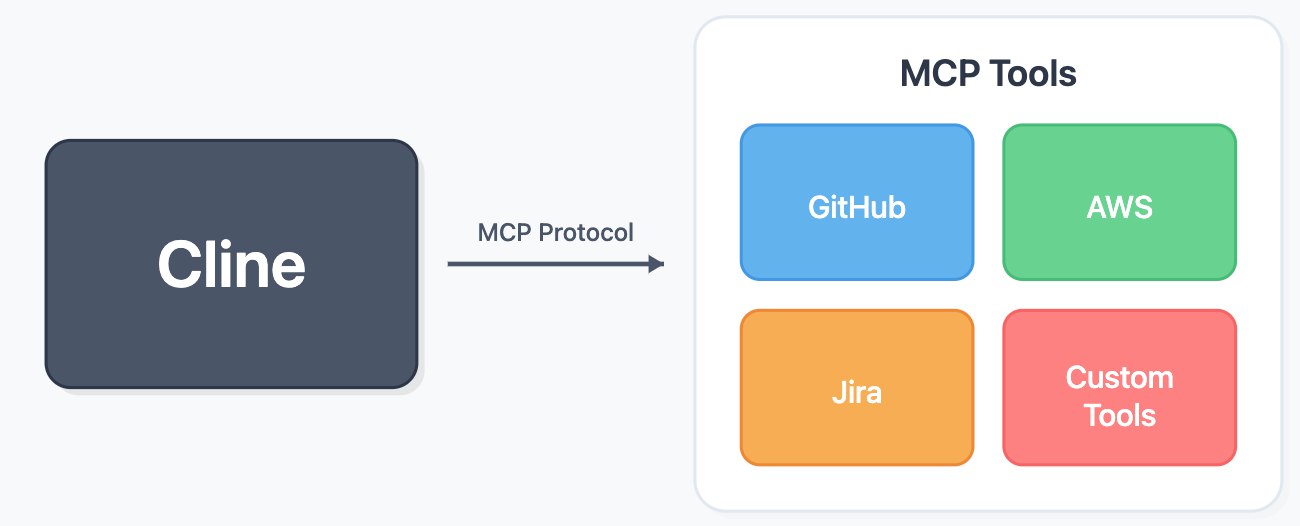
MCP
未读
.video-container {
position: relative;
width: 100%;
padding-top: 56.25%; /* 16:9 aspect ratio (height/width = 9/16 * 100%) */
}
.video-container iframe {
position: absolute;
top: 0;
left: 0;
width: 100%;
height: 100%;
}
Cline安装及使用1.条件与环境1.1 前提条件
软件/账号
是否必须
VSCode 1.93+
Y
Node.js 18.x+
JavaScript/TypeScript 实现的MCP服务必须
Python 3.10+
Y
uv
Y
AI API Key
Y
1.2 本文运行环境
平台/软件
版本
操作系统
Windows 10 企业版 22H2 19045.4046 64位
VSCode
1.98.2 ...
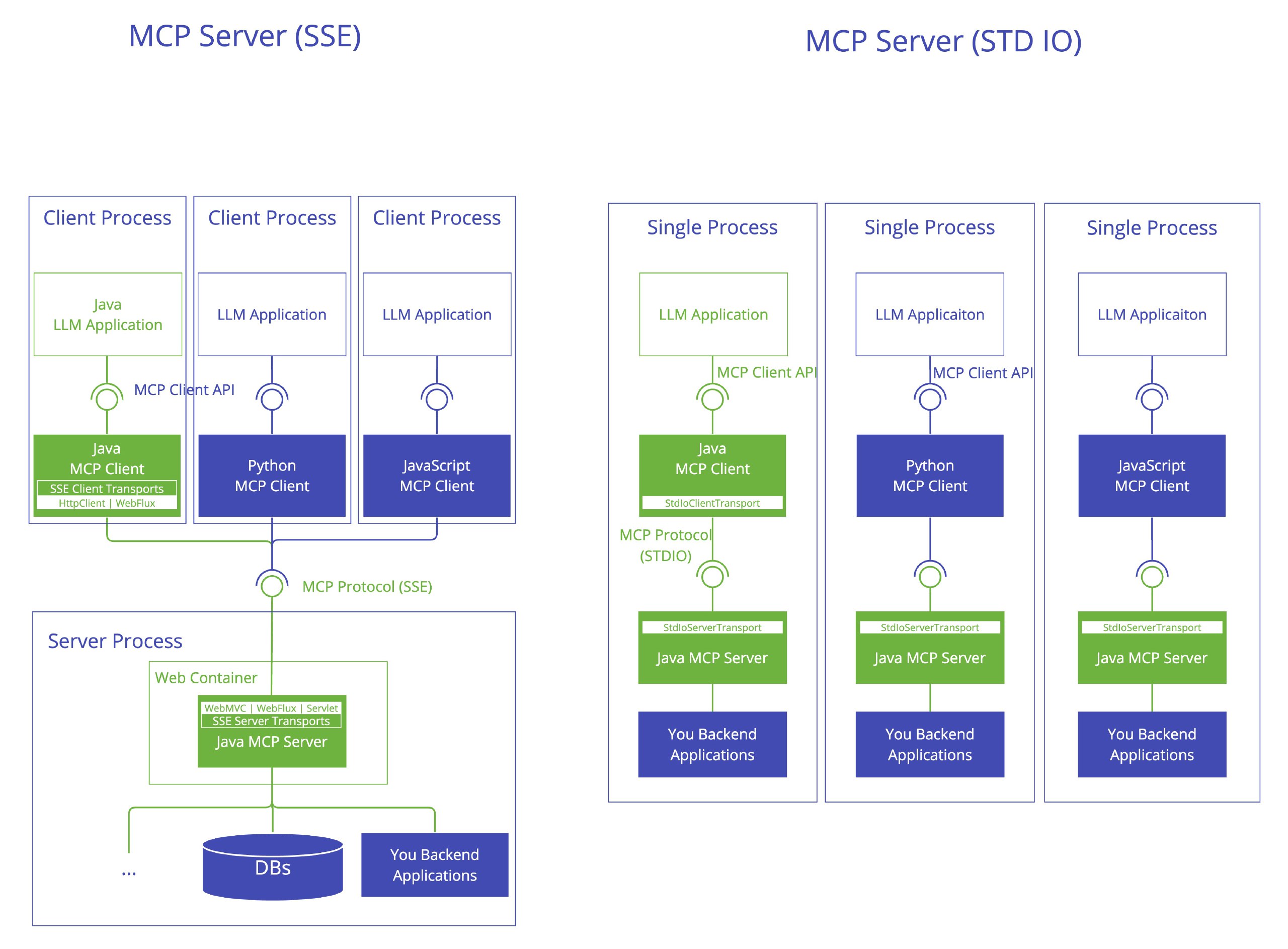
.video-container {
position: relative;
width: 100%;
padding-top: 56.25%; /* 16:9 aspect ratio (height/width = 9/16 * 100%) */
}
.video-container iframe {
position: absolute;
top: 0;
left: 0;
width: 100%;
height: 100%;
}
MCP Server 笔记1.条件与环境1.1 前提条件
软件/账号
是否必须
VSCode 1.93+
Y
Node.js 18.x+
JavaScript/TypeScript 实现的MCP服务必须
Python 3.10+
Y
uv
Y
AI API Key
Y
1.2 本文运行环境
平台/软件
版本
操作系统
Windows 10 企业版 22H2 19045.4046 64位
VSCode
1.9 ...
.video-container {
position: relative;
width: 100%;
padding-top: 56.25%; /* 16:9 aspect ratio (height/width = 9/16 * 100%) */
}
.video-container iframe {
position: absolute;
top: 0;
left: 0;
width: 100%;
height: 100%;
}
MCP 笔记1.条件与环境1.1 前提条件
软件/账号
是否必须
VSCode 1.93+
Y
Node.js 18.x+
JavaScript/TypeScript 实现的MCP服务必须
Python 3.10+
Y
uv
Y
AI API Key
Y
1.2 本文运行环境
平台/软件
版本
操作系统
Windows 10 企业版 22H2 19045.4046 64位
VSCode
1.98.2
P ...

.video-container {
position: relative;
width: 100%;
padding-top: 56.25%; /* 16:9 aspect ratio (height/width = 9/16 * 100%) */
}
.video-container iframe {
position: absolute;
top: 0;
left: 0;
width: 100%;
height: 100%;
}
PowerShell 笔记1.运行环境Windows (x86/x64/arm64) / macOS / Linux
截至 2025-03-20 最新版本:7.5.0 (2025-01-24 发布)
2.安装运行Windows 版本升级Windows系统通常已集成PowerShell,后续想要新版本则需进行升级。
Tips:PowerShell v5和v7安装目录有所不同、可以并存。
下载PowerShell v7 ZIP包【点击直达】,解压到$env:ProgramFiles ...
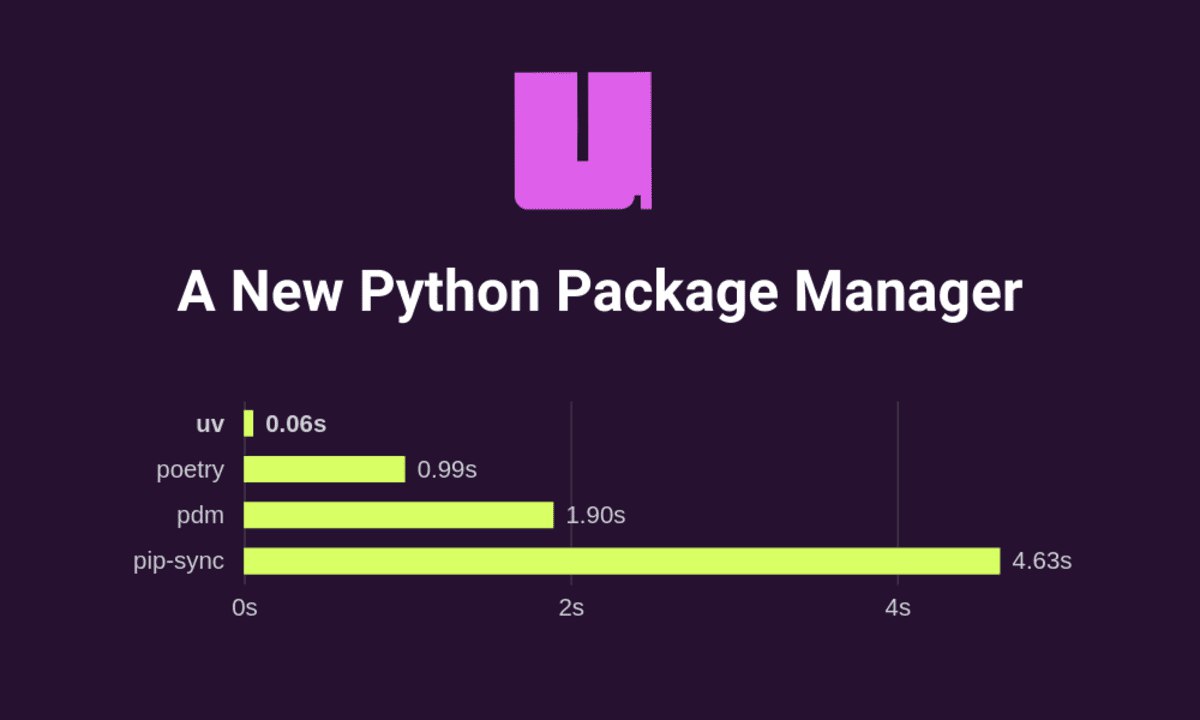
.video-container {
position: relative;
width: 100%;
padding-top: 56.25%; /* 16:9 aspect ratio (height/width = 9/16 * 100%) */
}
.video-container iframe {
position: absolute;
top: 0;
left: 0;
width: 100%;
height: 100%;
}
uv 笔记简介Rust写的Python包管理器和项目管理器,号称以一替多、秒杀pip、poetry、virtualenv等;特点:快。
详见官方文档【点击直达】
安装Windows1powershell -ExecutionPolicy ByPass -c "irm https://astral.sh/uv/install.ps1 | iex"
将安装到${user}/.local/bin目录下:
提示安装成功后,关闭命令行窗口重新打开 ...

开源软件
未读
.video-container {
position: relative;
width: 100%;
padding-top: 56.25%; /* 16:9 aspect ratio (height/width = 9/16 * 100%) */
}
.video-container iframe {
position: absolute;
top: 0;
left: 0;
width: 100%;
height: 100%;
}
GitHub注册示例1.注册1.浏览器访问GitHub官网【点击直达】,点击【Sign up】:
2.依次填写信息:
Tips:尽量使用大众化的邮箱(如QQ、Outlook、Gmail等),小众邮箱(如自建域名邮箱、2925邮箱)注册后可能出现无法fork项目等问题
2.登录如无意外,已成功注册;点击【Sign in】:
填写用户名或Email、密码:
登录后的首页:
.video-container {
position: relative;
width: 100%;
padding-top: 56.25%; /* 16:9 aspect ratio (height/width = 9/16 * 100%) */
}
.video-container iframe {
position: absolute;
top: 0;
left: 0;
width: 100%;
height: 100%;
}
【Troubleshooting】SpringBoot应用部署到Tomcat10运行时NPE1.问题描述1.1 环境
平台/软件
版本
操作系统
Windows 10 企业版 22H2 19045.4046 64位 / Linux version 4.19.90-2107.6.0.0100.oe1.bclinux.x86_64 (mockbuild@compute1) (gcc version 7.3.0 (GCC))
IDEA
2023.2.4 ...

.video-container {
position: relative;
width: 100%;
padding-top: 56.25%; /* 16:9 aspect ratio (height/width = 9/16 * 100%) */
}
.video-container iframe {
position: absolute;
top: 0;
left: 0;
width: 100%;
height: 100%;
}
IDEA中设置SpringBoot应用使用本地Tomcat启动1.条件与环境1.1 前提条件在IDEA中可成功运行的SpringBootWebApplication
1.2 本文运行环境
平台/软件
版本
操作系统
Windows 10 企业版 22H2 19045.4046 64位
IDEA
2023.2.4 (Ultimate Edition)
Tomcat
11.0.2
SpringBoot
3.3.5
Spring
6.1.14
2 ...

编程语言
未读
.video-container {
position: relative;
width: 100%;
padding-top: 56.25%; /* 16:9 aspect ratio (height/width = 9/16 * 100%) */
}
.video-container iframe {
position: absolute;
top: 0;
left: 0;
width: 100%;
height: 100%;
}
JDK下载与安装配置官网下载访问官网:【点击直达】
可切换为简体中文显示:
如果没有账号,先注册账号:
提示确认邮箱:
邮箱中将收到如下邮件,点击【Verify Email Address】或复制链接到浏览器打开、完成注册:
官网首页依次点击【资源】-【Java 下载】进入下载页面:
该页面可下载所有LTS版本,比如Windows平台的最新Java8 64位压缩包版本:
如果当前是未登录状态,则填写邮箱和密码登录:
登录成功,自动弹出下载对话框:
安装与配置 ...

.video-container {
position: relative;
width: 100%;
padding-top: 56.25%; /* 16:9 aspect ratio (height/width = 9/16 * 100%) */
}
.video-container iframe {
position: absolute;
top: 0;
left: 0;
width: 100%;
height: 100%;
}
LinkAndroid-全能Android手机连接助手1.前提条件
手机开启开发人员选项和USB调试/无线调试
Tips: 荣耀手机开启方法:设置->关于手机,连续点击7次“版本号”,直到屏幕提示“您正处于开发者模式!”
2.运行环境
Windows 10+ (x86/arm64) / macOS 10.15+ (x86/arm64) / Linux (UOS,Ubuntu,Deepin) (x86/arm64)
截至 2024-11-21 最新版本:0. ...